My Journey to My Best Year Yet: 7 Ways I Made Lavendaire’s Workbook Work for Me
All photographs are original works taken and created by dreamlikediana. All artwork and content are protected by copyright law. Reproduction or distribution without express written permission is strictly prohibited. ©DREAMLIKEDIANA - All Rights Reserved
I’ve used the Artist of Life Workbook by Lavendaire for 3 years now, and I’ve used it differently each time. This year, I’ve really gone the extra mile to make it different and more up my alleyway. If you’re considering purchasing the Artist of Life Workbook, maybe these will help you get an idea of what you could do with yours. Remember, you can get 10% off your Lavendaire order by using the code DREAMLIKEDIANA10 at check out :).
Just a heads-up: None of my blog posts are not sponsored! Every post is honest and straight from the heart, sharing information and value that I believe could genuinely benefit you. This post does include affiliate links, which means I might earn a small commission if you make a purchase (at no extra cost to you!). Want to know more about the brands I’m affiliated with? Click here to learn more! 😊Turning weekly section into a journaling space
Usually planners are for planning right? The author of the Artist of Life workbook, Lavendaire, continues to note that the workbook is not a planner. It’s a workspace to help you figure out and map out your dream life.
I won’t lie, I was using the workbook less and less over the last few months because I felt exhausted from reiterating my to-do list in multiple places, the workbook, my Passion Planner, & Notion. I was using The Artist of Life workbook too much like another planner. I wasn’t using it as it was intended—my goals & dream life. Therefore, many things didn’t get done because I was focusing on the wrong things. I don’t need multiple to do lists!
Therefore, I changed the weekly section of the workbook as a space for reflecting accordingly on what I did each week.
Did I do anything at all?
Did I not?
What did I do?
What didn’t I do?
What steps did I take towards my goals?
What made a difference?
What could I have done better?
Etc.
Of course, the workbook has monthly reflections already, but what about weekly reflections? Weekly reflections are just as important to help keep you on track! Think about it.
💖 Psst... I also run a small art shop! If you love cute, useful things like stickers, journals, or creative tools—check out what’s new in my store.
Turning weekly section in goal mind maps
Another way I started to make the Artist of Life workbook work more for me is by turning the weekly section into goal mind maps. Instead of a journaling section, like shown above, now we have a space to break down big goals into doable steps.
Maybe you don’t have big goals, but maybe you do? If you don’t, the journaling section will work great for you! But if you’re like me and have some big goals that you want to tackle towards, this is a great way to really nail down what you need to do for those goals.
Just about ANY goal you have can be and is made up of many steps before you can reach them. Sometimes it’s so hard to complete these goals unless you break them down into doable actions. If a step is still too big to tackle, break it down further.
So for example, my overall “big” goals are:
My website/blog
My Etsy shop
My daily life
Snowboarding
As you can see from the photo, I broke them down into steps that I really needed to do in making headway with these goals. In such a way where I feel like, even if I accomplished 2 or 3 of those steps during the month, I would feel successful. Because if you think about it, some goals take time to tick them off. It took the better of a year to nail my S-turns down in snowboarding! I kept catching a toe edge. Which is normal, but yet, it finally feels good to have that down.
While some other steps, towards the goals, may be easier to accomplish, and you can see you didn’t do “nothing” in your month. You DID do something. I think we forget as humans to track our progress sometimes, and we can’t see how far we’ve come unless we purposefully do so. To do lists and mind maps are the best way to see how far we’ve come.
If you’re struggling to break down your goals into doable steps, check out this AI feature called Baby Step. AI will help you break it down for you.
Making mini vision boards for each month
Part of the reason people don’t accomplish what they set out to do is because they don’t have a clear vision in mind.
There’s a section at the beginning of each quarter where the workbook lays out all 3 months. They’re not exactly 2”x3” size, but they’re good enough to print a mini vision board on Bluetooth printer paper. I use an HP Sprocket.
I started to paste them in instead of rewriting goals or steps each month because guess what? I still didn’t do them no matter how much I wrote them down. I couldn’t envision them, therefore, I couldn’t work towards them. I didn’t work towards them.
With a clear vision, and keeping my monthly vision board in multiple places, guess what finally happened? I started actually making things work FOR ME! I started seeing the results I had wanted to see.
How to Make a Vision Board that WORKS
Go to Canva.com (it’s free).
Create a canvas that’s 1080 px by 1920 px.
Now go to Pinterest.com and create a new board titled “Monthly Vision Boards.”
Within the new board create a new section and title it “___ Vision Board.” Replace “____” with a month you are making your vision board for. So if you’re making one for November 2023, you can say “November 2023 Vision Board”.
Use photos from Pinterest to map out your vision for each month.
Say for example you want to stretch more, find images of a simple stretches you can do every day. Save them to your board, not your computer YET.
Then take the next goal on your list, say you want to be more grateful, find some affirmations, find photos of people smiling, find images of gratitude journals. Save quotes about gratitude, etc.
You keep doing this with every goal you have FOR THE MONTH.
Save 1 photo from each goal, and save a few affirmations you have for the month. I like to sprinkle affirmations into my vision board that are RELEVANT to my goals.
When you’re done saving your photos, upload them to your canvas in Canva and play around with how it looks until you like it.
Export as png, put the vision board in multiple places, but if you want to print & insert it into your Artist of Life workbook, read the next how to.
How to Insert Vision Board via 2x3 Bluetooth Photo Printer
Once you have saved your vision board…
Send it to your phone.
Turn on Bluetooth & your photo printer’s app. I use an HP Sprocket, so I use the sprocket app.
When you open the vision board photo in the app, make sure nothing is cutting off. If it is, pinch to zoom out and realign it neatly until everything in the image is shown.
Another way to do this is by opening it up in a photo collage app, and fitting it to a 2x3 ratio within the app. Then hit save. Then export this photo to the Sprocket app. See gif below.
Print.
Cut off any white edges.
Paste into the Artist of Life workbook.
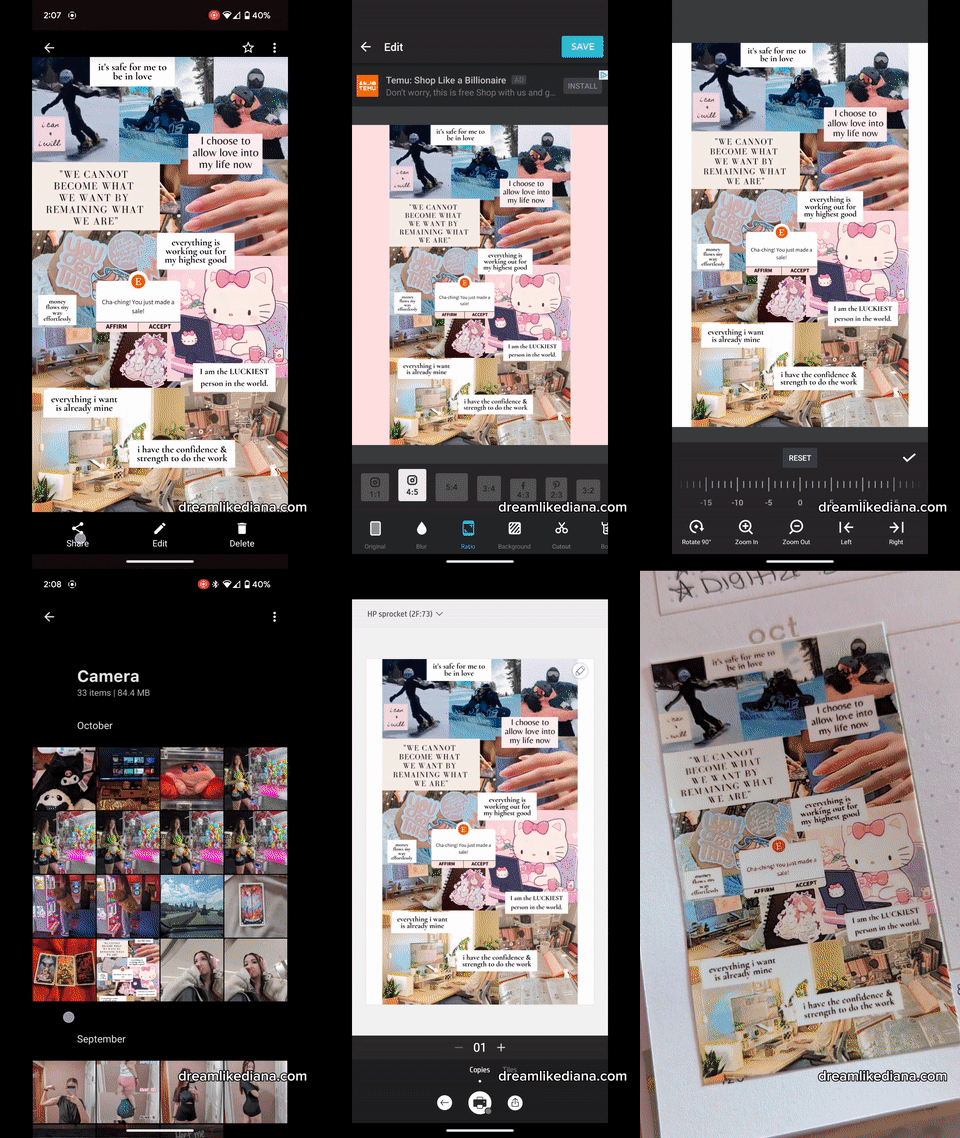
How to Insert Vision Board via Printer
If you don’t own an HP sprocket, no problem you can still print it out via a printer. But first we need to take some extra steps first.
Once you have saved your vision board…
Go back into Canva
Make a new canvas in the size 2 inches in width by 3 inches in height.
Upload the image of your vision board.
Click on your vision board image, but don’t let it turn full size. Instead, just click on it, and self-adjust it until it takes up the full canvas size BUT nothing is getting cut off.
Save this image.
And then go about your regular way of printing.
Cut, and then use some double sided tape to paste it into your Artist of Life workbook.
If you do any of these, tag me on Instagram at @colormiamazing I’d love to see!
Creating my own themes on what to reflect on for each day
The regular page of the Artist of Life workbook has this section in each of the month sections called “___ Highlights.” Where “___” is the month that you’re currently in. I already highlight my months in multiple different ways in multiple different planners. I needed something different, and therefore I started to create themes on what to focus on every day or rather every month. You may have seen examples of this in last year’s post about the Artist of Life workbook. Here are some other examples for themes:
An affirmation a day
What do I need today?
One memory a day
Things that make me happy
Today’s self-care routine
Words of encouragement to myself
How was I a friend to myself today?
I would break down the lines and number them out 1 through the days of that month, and split it into 2 columns. It is a small space, but you really don’t need much nor should you put too much going on here.
You could also very well turn this section into a monthly collage of what you’ve done, but this isn’t something I’ve done nor something I will do in the future. It’s not off the table, but you can very much so use a theme to make a collage or you can use your favorite memories from the month to make a collage. For me, I really enjoyed having a mini reflection space, as well as, themes to focus on for each day.
Using Year at a Glance pages as something to look back on
Once again, if you’re already using Lavendaire’s daily planner, weekly reset planner, or any other planner out there, you already have multiple different places to put future events, to-do lists, due dates, etc. that are coming up. If you don’t, this place is great for you to do so!
But for me, and so many others, I have too much going on in too many different places already, like I’ve mentioned.
This is my second year in a row that I’ve turned my “Year at a Glance” section, in the Artist of Life workbook, into a space to look back on by printing 5:4 photos on 2x3 Bluetooth printer paper.
This is my 2022 Artist of Life workbook, Year at a Glance, section.
How do I do that?
I use an internal photo edit and select the ratio 5:4 and hit save.
I then move the photo over to a photo collage app where I click the ratio 3x2 (horizontal version of 2x3) and my 5:4 photo is centered on it.
There should be white space on either side of it. This is what you want.
Once it prints out, cut off the white space, and stick it on top of the box you’re highlighting.
I really use my HP Sprocket A LOT! It’s one of thee best things to use if you really want to make the Artist of Life workbook work for you! You don’t need it, but it really helps to go the extra mile. The more time you spend looking and affirming your goals, the more work you’ll put towards them, the more action happens, the more things actually start moving & getting closer towards completion. If you don’t put in the love or the work, nothing will happen.
I got my HP Sprocket as a gift in July 2016, and have had it since! It works, and it works well for many different things.
Adding a rating scale to my quarterly review section
There is a rating scale for each monthly section in the Artist of Life workbook, but adding a rating scale for the quarterly section has been a huge game changer for me personally! It really lets me know, in terms of stats, how well did I do, in that quarter, with my goals, my life, etc. I like seeing graphs. It’s easier to digest information that way.
Thankfully, the boxes inside of the Artist of Life workbook now have dot grid so it makes drawing out a graph so easy.
Keeping it simple
Sometimes less is more when you’re overwhelmed with life. Sometimes setting up my planners brings me joy from having a sense of “me time,” but sometimes I just feel like I need to keep things simple.
In all honesty, I didn’t use my planners very much in the 3rd quarter of 2023. I did get a lot done despite not using them, but I was all over the place. I used my Artist of Life workbook more for journaling what I was going through in the back pages, which I won’t show, than actual planning. And sometimes that’s needed and necessary.
You don’t always need to be set in your ways or stuck in a box, you are allowed to venture outside of it and continuously grow with your planners.
One go-to method may work for you for one moment, but the next it doesn’t. Life happens, it’s okay, our planning styles should always be fluid. That’s why I’m writing this blog post so I can help others venture outside the lines that Lavendaire has provided for us. To show you all what you can do if you feel stuck, what you can do with it to make it work more for you! Because I’ve been there!
Truth be told, I feel highly guilty that I have so many empty spaces in my planners, and I feel like I let myself down by not using them. Yet, despite not using them, my life and year has been nothing short of amazing! Sometimes we just need a break from them, even if that break is longer than anticipated.
So for the 4th quarter, I decided to keep my pages simple. Just a simple pen, paper, and the modifications I mentioned here. Because at the end of the day, that’s all you really need to get started. Maybe stickers and washi tape isn’t for you, maybe you’re just a pen to paper type person. And that’s okay too!
Watch the Full Flip Through!
All in all,
I hope you found a method or two that you want to try! If you do please be sure to tag Lavendaire, Shop Lavendaire, and myself on Instagram. This post is not sponsored in any way shape or form, but I do have a 10% off affiliate code for their shop! I really enjoy their products and I want others to enjoy them too!
If you have any questions or comments, let me know in the comments section down below and I’ll get back to you at my earliest convenience.
Till next time!
~Diana
Use DREAMLIKEDIANA10 for 10% off from Shop Lavendaire


Liked this post? You can support me on:
FREEBIES | SHOP | AFFILIATES | YOUTUBE | & MORE